Store Configuration - Live Inventory Check

October 14, 2025
The LifeSaver Software Software allows you to verify warehouse moulding availability in real time when entering a work order that includes mouldings from integrated vendors Omega Moulding, Larson-Juhl, and Roma Moulding. When you add mouldings from these vendors to a work order, LifeSaver Software automatically checks inventory levels at their warehouses. This lets you confirm whether the required materials are in stock—helping you avoid delays caused by backorders. This article walks you through how to check moulding availability using LifeSaver Software’s integrated vendor tools, so you can confidently plan and complete work orders without supply interruptions.
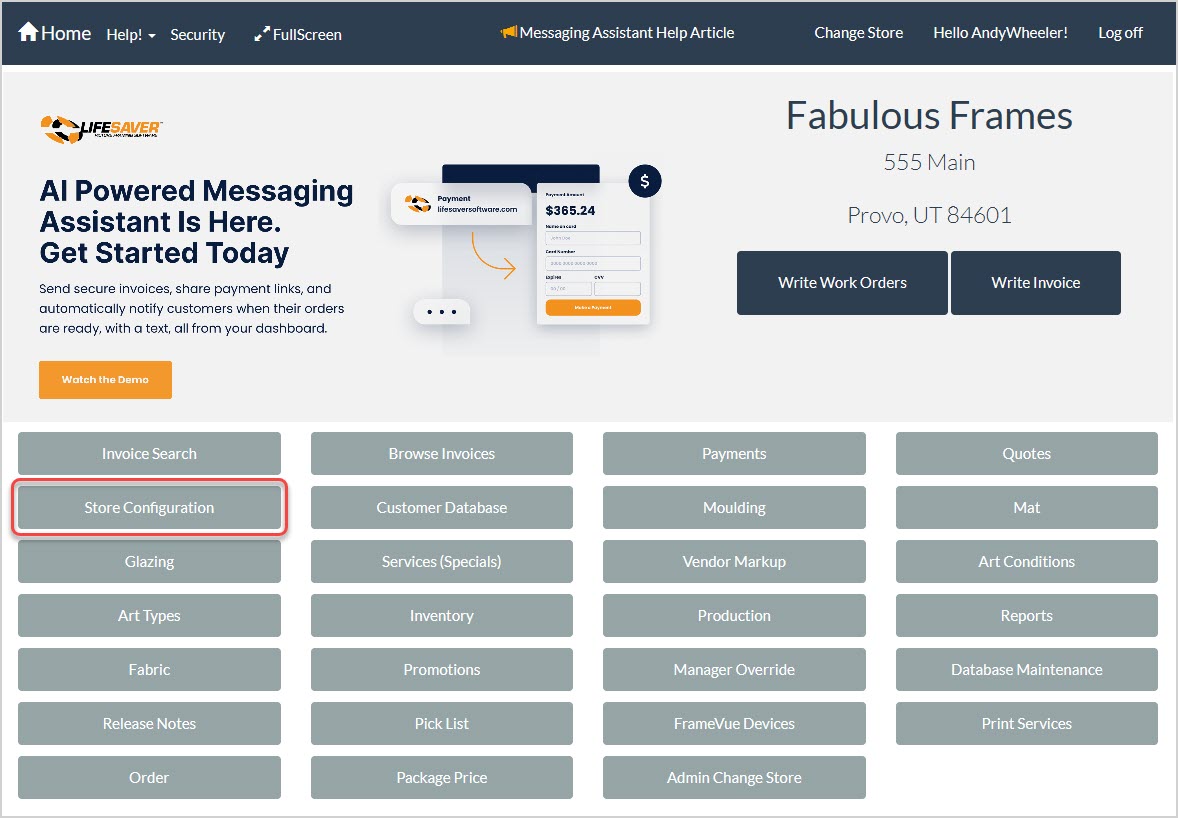
To access this setup area in the LifeSaver Software software, click the Store Configuration button on your Home screen and then click the Live Inventory Check tab.
Understanding the Live Inventory Check Tab
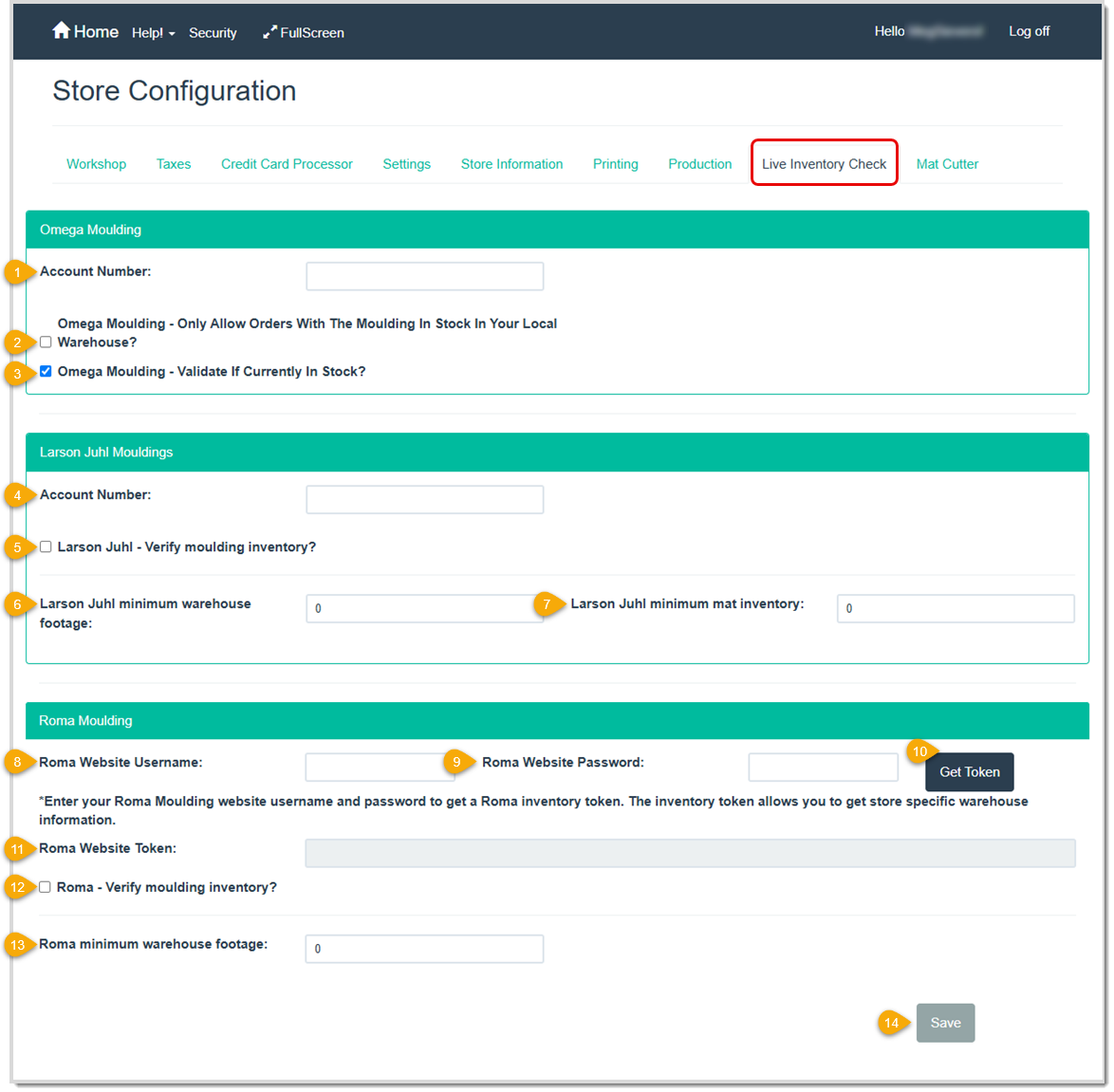
- Account Number – Enter your Omega Moulding business account number.
- Omega Moulding – Only Allow Orders With The Moulding In Stock In Your Local Warehouse – Select this option to limit inventory checks to your local warehouse. If the selected moulding is out of stock locally, a message will display other warehouse locations where it’s available. You can choose to proceed with shipping charges or select a different moulding.
- Omega Moulding – Validate if Currently In Stock – Select this checkbox to confirm stock availability before finalizing the work order. If the moulding is out of stock, a message appears when you enter the moulding number, allowing you to proceed with in-store stock, wait for back-ordered materials, or choose an alternative.
- Account Number – Enter your Larson-Juhl business account number.
- Larson Juhl – Verify Moulding Inventory – Select this checkbox to confirm stock availability before finalizing the work order. If the moulding is out of stock, a message displays with available quantities at other warehouse locations. Contact Larson-Juhl for shipping options or delivery estimates.
- Larson Juhl Minimum Warehouse Footage – Enter a footage threshold to trigger a low-stock warning. For example, entering 500 will display a warning if the selected moulding has 500 feet or less in stock.
- Larson Juhl Minimum Mat Inventory – Enter a quantity threshold to trigger a low-stock warning for mats. For example, entering 10 will display a warning if the selected mat has 10 or fewer units in stock.
- Roma Website Username – Enter the username you use to sign into the Roma Moulding website.
- Roma Website Password – Enter the password you use to sign into the Roma Moulding website.
- Get Token – Click this button to get the website token needed to check for stock quantities in Roma Moulding warehouses. The token is automatically added to the blank field to the left of this button.
- Roma Website Token – This field automatically populates with a token when you click the Get Token button.
- Roma – Verify Moulding Inventory – Select this checkbox to confirm stock availability before finalizing the work order. If the moulding is out of stock, a message displays with available quantities at other warehouse locations. Contact Roma Moulding for shipping options or delivery estimates.
- Roma Minimum Warehouse Footage – Enter a footage threshold to trigger a low-stock warning. For example, entering 500 will display a warning if the selected moulding has 500 feet or less in stock.
- Save – Click this button to save your selections and start automatically checking in-stock warehouse quantities when you write a work order.
Related Topics
Store Configuration Tour
Writing a Work Order
Frequently Asked Questions
Q: I have a question, but I can't find my answer here, how do I get more assistance?
A: You can ask any question at the link below, once received one of our technicians will be in touch! If you need immediate assistance, the LifeSaver Software team is available Monday through Friday, from 9:00am to 6:00pm Eastern time. Feel free to contact our support team at: 1-800-381-0600, extension 2. Or you can email us at support@lifesaversoft.com and we will respond within 24-hours.
Important Note: This function is only available if you are subscribed to LifeSaver Software’s Enterp
The Moulding page lets you view Moulding details and create your in-stock store inventory of Mouldin
The Mats page is an essential part of the LifeSaver Software software that lets you view Mat details


Is this page helpful?
×Help us improve our articles